Build a web map with open source tools!
Lyzi Diamond
OSB 2015
Oh my goodness, this talk was hard to write.
I rewrote it a bunch of times.
Writer's block happens with conference talks too, you know.
So I'm just going stream of consciousness here.
We'll see how it goes.
So my goal today is for you to walk away understanding a little about open source web mapping...
... and
maybe a little about
Mapbox, too.
I also want to reinforce the idea that maps are hard...
... but totally worth it.
So let's start there with one of my favorite web maps.
Let's talk about what's going on here.
First of all, the entire map is housed in a map container in a div.
We have that
map container thanks to our
web mapping library:
Mapbox.js!
Mapbox.js contains a ton of useful web mapping functions.
Chief among them is loading map tiles.
"What are map tiles?" you ask?
Well I'd be happy to tell you!
Let's go back in time.
In 1996, Mapquest launched its web service.
Directions for driving! Online! Wow!
The problem: it was slow to load :(.
Mapquest required a full page refresh to scroll or zoom and was always aligned to map image boundaries.
Then, in 2005, came Google Maps. This revolutionized everything.
But what was the revolution?
Was it the interface?
The red marker?
The weather widget?
No!
It was the
tile. 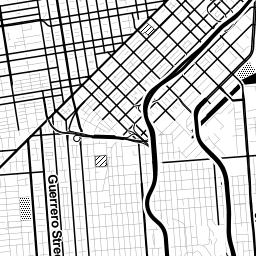
In particular, the raster tile.
Raster tiles are 256px x 256px PNG files that are stored on the server and served to the browser on request.
Each tile is one piece of the map in a grid of pieces.
You may think of this as a basemap.
(This kind of map is colloquially called a slippy map.)
Only the tiles in the current map view are requested and loaded. This makes modern web maps super hella fast.
Raster tiles are available at preset zoom levels with a different set of tiles at each zoom.
Zoom level 0: one tile for the world.
Number of tiles = 2^z x 2^z.
Zoom level 1: 4 tiles for the world.
Zoom level 2, 3, 4, 5
This was innovative in 2005...
... but it's also limiting, especially now.
Vector tiles are similar to raster tiles...
... but instead of creating tiled images, we create tiled vector data that can be styled in the browser.
Roads, parks, water bodies, bike paths, points of interest, state boundaries...
... all of this is vector data with attributes attached to it.
Vector tiles store all of this information, attributes included, as protocol buffers, or PBF files.
Protocol buffers are super lightweight and compact.
So vector tiles are one of the super awesome open source components of web maps.
They are the foundation.
And Mapbox.js is what makes them possible!
So back to our example...
Where did these map tiles come from?
They seem to be highlighting bike routes.
(Capital Bike Share stations too, but these features are interactive and not part of the underlying style.)
They're quite aesthetically pleasing!
These tiles were created with our
desktop design tool,
Mapbox Studio.
Using a
styling language called
CartoCSS, you can
style any
vector data you wish.
(It comes
pre-loaded with
three Mapbox-curated
datasets but you can
add your own if you want.)
From Mapbox Studio, you can upload a style to your account and use it in Mapbox.js, like in this example.
So when the
map container on your page makes a
request to
GET
the map tiles...
... the custom style is being applied to the associated vector tiles to render tiled images in the container.
Boom! Tiles in a map!
Awesome. So what else is in this example?
We have two markers that we can move around: the origin point and the destination point.
Pause. Are you noticing a pattern?
This whole process is made up of tiny, self-contained components
many of them open source
that work together to build these seemingly simple mapping applications.
Anyway.
We also give the marker a location to draw itself and flag it as draggable so we can change the starting point of our trip.
We then create a second marker that has a different style but is also draggable.
Then we add both of them to the map.
Sweet. We have a map with tiles and two draggable markers.
What else?
When we move the markers, there are some directions that appear on the map.
There are walking directions from the markers to the nearest Capital Bike Share stations...
... and there are cycling directions between those stations.
That's actually four separate things the map is doing.
(Remember when I said maps are hard?)
1. Adding the bike share stations to the map
2. Locating the nearest station to each marker
3. Generating walking directions between the markers and the stations
4. Generating the bike directions between the stations
The bike share stations are housed in a GeoJSON file.
GeoJSON is an extension of
JSON, which stands for
JavaScript Object Notation.
Because GeoJSON is just JavaScript, it can easily be used in web maps!
This example uses
jQuery to
load the GeoJSON and then
adds them to the map with
L.marker
objects.
Just to digress into one of the many silly nuances of web mapping...
Notice what's going on in this code with the latitude and longitude pair.
There is
much disagreement about whether
coordinates should be written
[lat, lon]
or
[lon, lat]
.
GeoJSON prefers
[lon, lat]
, but
Leaflet (and thus
Mapbox.js) both prefer
[lat, lon]
.
This is annoying.
Moving on.
Once the bike share locations are added to the map, we have to locate the nearest one to the start and end markers.
To do this, we use
another awesome
open source library called
Turf.js.
Turf.js is a spatial analysis library.
Spatial analysis is used to describe relationships between geographic data.
This example uses the
turf-nearest function to find the
nearest station to the markers.
This operation happens dynamically every time the markers are dragged.
And it's like, super hella fast!
Routing is kinda complicated to implement but actually quite straightforward in theory.
Every path (road, trail, etc.) has a bunch of attributes.
Like speed limit, grade, bike lanes, length...
Each of these attributes has has a cost associated with it.
The role of the routing algorithm is to find the lowest cost path from point A to point B.
That means costs are assigned based on the goal of the routing.
Not just shortest distance, but also faster roads.
Walking directions? Roads with sidewalks are less costly.
Where do these attributes come from?
The
Mapbox Directions API is built on top of the
Open Source Routing Machine (OSRM), an
open source project built on top of
OpenStreetMap.
OpenStreetMap is a crowd-sourced map of the world -- a huge dataset full of interesting things.
It is also a pretty comprehensive resource of road data.
OpenStreetMap features are defined by tags.
The Directions API routing algorithms assign costs to each tag.
Boom! Bike directions!
So the open source project tally right now stands at:
Mapbox.js, Turf.js, OSRM, vector tiles, GeoJSON...
That's it, right?
Nope! One more!
So what's going on here?
In this example, we hit the API along an array of points of the calculated bike route...
... and we hit against a
vector terrain dataest that is
pre-curated by Mapbox,
Mapbox Terrain.
The Surface API returns elevation data from the Mapbox Terrain dataset.
Then the percent grade along the route is calculated and displayed on the map.
No more surprises. That's the whole map.
So, concisely, what does it do?
- Displays vector tiles with bike routes
- Pans and zooms
- Shows the Capital Bike Share stations
- Has draggable markers for origin and destination
- Finds closest bike share station to origin and destination
- Shows walking directions to/from bike share stations
- Shows a bike route between bike stations
- Shows elevation and percent grade change along the bike route
That's a lot of things.
And that's just scratching the surface of what open source mapping tools can do.
Everything from the
static map APIsto the
crazy awesome native GL maps is
new and changing.
Spatial problems are everywhere
And more elegant, open source tools we have to work on them, the better!
(If we have time, I'll show off some other cool map stuff.)
Thanks!